
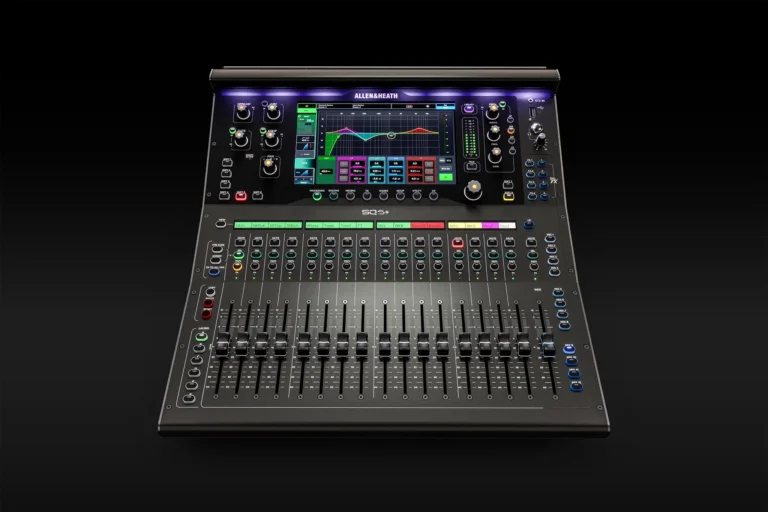
Buying a Mixer: Analogue or Digital Mixer? Discover Which Audio Mixer Suits Your Needs
Buying a mixer may seem straightforward at first, but once you start exploring the available options, you’ll quickly come across different types of mixing consoles, features and possibilities. Should you choose an analogue mixer or a digital mixer? How many channels do you need? Do you need built-in effects? And what is the difference between a basic audio mixer and a professional digital mixing console?
A good audio mixer is at the heart of many sound systems. Microphones, instruments, media players and other audio sources all come together in the mixer, where you can adjust the sound and send it to active speakers, amplifiers, monitors or subwoofers.
At SpeakerKoning, you’ll find mixers for a wide range of applications, from compact mixing consoles for small setups to advanced digital mixers for professional live productions.
In this guide, we explain what to look for when buying a mixer and help you determine which solution best suits your needs.
What Is an Audio Mixer?
An audio mixer, also known as a mixing console, is used to combine different audio signals, adjust them and send them to the appropriate outputs.
For example, consider a live band with vocal microphones, guitars, keyboards and drums. All these signals are fed into separate channels on the mixer. For each channel, you can adjust the volume and various sound characteristics.
Depending on the type of mixer, you can work with:
- Volume and faders
- Gain and input levels
- Equaliser (EQ)
- Aux outputs
- Monitor sends
- Effects
- Compression
- Gate
- Signal routing
- USB audio
- Recording functions
- Bluetooth
- Digital presets and scenes
A mixer therefore gives you control over the entire audio signal chain.
Which Mixer Do You Need?
The right mixer mainly depends on the application. A compact audio mixer for a small presentation, for example, has very different requirements from a digital mixing console for a band or professional event.
Before buying a mixer, it is therefore worth considering:
- The number of channels required
- The number of microphones
- The number of instruments
- The number of monitor outputs
- The effects you need
- The connections you require
- How you want to operate the mixer
- Whether you need to save settings
- Any recording and streaming capabilities
If you only need to connect a few audio sources, a compact analogue mixer can be an excellent choice. If you work with multiple monitor mixes, many channels and complex routing, a digital mixer usually offers considerably more possibilities.
Analogue Mixer: Simple and Direct
An analogue mixer is still an excellent solution for many users. Its operation is clear and straightforward: almost every function has its own button, rotary control or fader.
You often don’t need to navigate through menus to change a setting. Want to adjust the volume of a microphone? Simply move the corresponding fader.
Advantages of an Analogue Mixer
An analogue mixer offers several advantages, including:
- Direct operation
- Clear layout
- Easy to use
- Often an attractive purchase price
- No complicated digital menus
- Suitable for small and medium-sized sound systems
This makes an analogue mixing console an interesting choice for bands, cafés, rehearsal rooms, clubs, schools and smaller events.
Direct operation can also be an advantage when several people use the mixer. The most important functions are usually immediately visible.
When Should You Choose an Analogue Mixer?
Buying an analogue mixer is a good option when simplicity and direct operation are your main priorities.
An analogue mixer is particularly suitable if you:
- Work with a limited number of channels
- Want to adjust settings quickly
- Don’t need extensive presets
- Don’t use complex routing
- Value a clear and straightforward layout
- Are looking for an affordable mixer
For a small band with a few microphones and instruments, for example, an analogue mixer may be more than sufficient.
Digital Mixer: Maximum Flexibility
A digital mixer works differently. The audio signal is processed digitally, allowing a wide range of functions to be handled through software.
This provides considerable flexibility. A digital mixing console can include advanced equalisers, compressors, gates and effects without requiring separate hardware for every function.
Another major advantage is the ability to save settings.
Imagine mixing the same band every week. With a digital mixer, you can save specific settings as a scene or preset. At the next rehearsal or performance, you can recall these settings and adjust them whenever necessary.
Advantages of a Digital Mixer
Digital mixers offer features such as:
- Extensive DSP functionality
- Digital equalisers
- Compressors and gates
- Built-in effects
- Presets and scenes
- Flexible routing
- Multiple monitor mixes
- Control via tablet or computer
- USB audio and recording functions on many models
- Numerous features in a relatively compact housing
That is why digital mixers are popular with professional sound engineers, bands, theatres, churches, rental companies and event production teams.
Analogue or Digital Mixer: Which Is the Best Choice?
There is no universal answer to the question of which mixer is best. The right choice depends on your application.
Choose an Analogue Mixer If:
- You mainly want simplicity
- You prefer working directly with buttons and faders
- You use relatively few channels
- You don’t need extensive presets
- You have a straightforward PA system
- You value an attractive price
Choose a Digital Mixer If:
- You use many channels
- You need multiple monitor mixes
- You want to save settings
- You want to use built-in effects
- You need extensive routing options
- You regularly work at professional events
- You want to control the mixer remotely
For professional live productions, a digital mixer often offers many more possibilities. For a straightforward sound system, an analogue mixing console may be quicker and more practical.
How Many Channels Do You Need?
One of the most important decisions when buying a mixer is choosing the number of channels.
You need a channel for every individual audio source you want to connect to the mixer. These may include microphones, instruments, media players or other sources.
A small presentation may only require two or four channels. A band, on the other hand, can quickly need many more.
For example:
- Vocal microphones
- Kick drum
- Snare drum
- Overhead microphones
- Guitar
- Bass guitar
- Keyboard
- Playback
- Guest microphones
It is worth considering more than just your current requirements. Having a few extra channels can be very useful in the future.
What Are Aux Outputs?
Aux outputs are important when working with monitors or separate audio mixes.
An aux output allows you to create a separate monitor mix for a musician, for example. The singer can hear more vocals, while the drummer may need more guitar and bass in their mix.
Multiple aux outputs can therefore be particularly important for larger productions.
When buying a mixer, check not only the number of input channels but also how many individual outputs and aux buses are available.
Equaliser: Fine-Tuning Your Sound
Almost every mixer features some form of EQ, or equaliser.
An equaliser allows you to adjust different frequency ranges. For example, you can make a vocal sound clearer, reduce unwanted low frequencies or help an instrument sit better in the overall mix.
On a basic analogue mixer, the EQ usually consists of several fixed bands. Digital mixers generally offer more extensive options, such as parametric equalisers.
This can make a significant difference in professional live sound applications.
Built-in Effects
Many mixers nowadays feature built-in effects.
These include:
- Reverb
- Delay
- Chorus
- Other digital effects
Reverb can play an important role, particularly for vocals. With a digital mixer, you can often configure effects very precisely and apply them to individual channels.
Some analogue mixers also include effects, but larger productions may require external equipment or a separate effects processor.
Mixer for PA Systems
A mixer is often an essential part of a complete PA system.
A typical sound system may consist of:
Microphones → Mixer → Active Speakers → Subwoofers
With a passive PA system, an amplifier may also be required in the signal chain.
The mixer brings all audio sources together and allows you to send the sound to the different components of the system.
Already have active speakers? You can connect the mixer directly to the speakers. Passive speakers generally require a suitable power amplifier.
Mixer for Bands and Live Music
For bands, a mixer is often the central component of the entire live sound system.
A larger band may require many input channels, multiple monitor mixes and extensive EQ and dynamics processing options.
A digital mixer can offer significant advantages here. You can save settings for different venues and quickly recall them when needed.
Remote control via a tablet can also be particularly practical during a performance. For example, the sound engineer can move around among the audience and assess the sound from different positions in the venue.
Mixer for DJs
DJs often have different requirements from live bands.
For DJ applications, multiple stereo inputs, good volume control and an intuitive layout are particularly important. Depending on the application, a dedicated DJ mixer may be more suitable than a traditional PA mixer.
The mixer can then be combined with active speakers and one or more subwoofers to create a complete DJ setup.
Mixer for Presentations and Events
Mixers also play an important role in presentations, conferences and corporate events.
Multiple wireless microphones, a laptop, music player and other sources can all be combined through the mixer.
Larger events may require multiple microphones and separate zones or monitor mixes. A mixer with sufficient channels and routing options provides the flexibility needed.
Important Connections and Features
When buying a mixer, pay attention to the connections and features you actually need.
Important points to consider include:
- Number of microphone inputs
- XLR connections
- Line inputs
- Stereo inputs
- Aux outputs
- Main outputs
- Monitor outputs
- USB connection
- Bluetooth
- Built-in effects
- Phantom power for condenser microphones
- EQ per channel
- Compression
- Digital routing
- Recording functionality
Not every mixer offers the same features. Always check the technical specifications carefully.
Buy a Mixer at SpeakerKoning
When choosing an audio mixer, it is important to look beyond the number of channels or the price. Think carefully about how you intend to use the mixer.
For a small setup, a compact analogue mixer can be a practical and affordable solution. For larger productions, bands, theatres and professional events, a digital mixer often offers many more possibilities.
The rest of your sound system also plays an important role. After all, a mixer works together with your microphones, speakers, subwoofers, amplifiers and other equipment.
At SpeakerKoning, you can combine different solutions to create a complete professional sound system.
Explore our range of mixers, compare the available options and choose the audio mixer that suits your application, setup and future plans.
Frequently Asked Questions About Mixers
What Is the Difference Between an Analogue and a Digital Mixer?
An analogue mixer processes the audio signal in an analogue format and usually offers direct operation. A digital mixer processes the signal digitally and often provides more advanced features such as presets, effects, extensive routing and digital processors.
How Many Channels Do I Need on a Mixer?
That depends on the number of audio sources you want to connect. Add up your microphones, instruments and other sources, and preferably leave a few channels available for future expansion.
Can I Connect a Mixer to Active Speakers?
Yes. A mixer can be connected directly to active speakers. Passive speakers generally require a suitable power amplifier.
Do I Need a Mixer for a PA System?
Not always. Simple PA systems can sometimes be used directly with an audio source. However, as soon as you want to combine multiple microphones, instruments or other sources, a mixer becomes particularly useful.
Is a Digital Mixer Difficult to Operate?
This varies by model. Digital mixers offer more possibilities, but they often have a steeper learning curve than analogue mixers. However, many modern digital mixers are designed to make operation as straightforward as possible.
Which Mixer Is Suitable for a Band?
For a band, having enough channels is particularly important. Aux outputs, effects, EQ, compression and monitoring options may also be essential. A digital mixer can offer many advantages for larger bands.
The Right Mixer Makes All the Difference
A good mixer gives you control over your entire sound system. Whether you’re working with a small band, DJ setup, presenter, church, theatre, event or professional live production, the right mixing console ensures that all audio sources come together clearly and can be processed optimally.
If simplicity and direct operation are your main priorities, an analogue mixer can be an excellent choice. If you need maximum flexibility, digital processing and extensive routing options, a digital mixer will often be the better solution.
First determine what you’ll be using the mixer for, how many channels you need and which features are important for your application. This will help you avoid running out of options and invest in an audio mixer that will continue to meet the needs of your sound system in the future.
